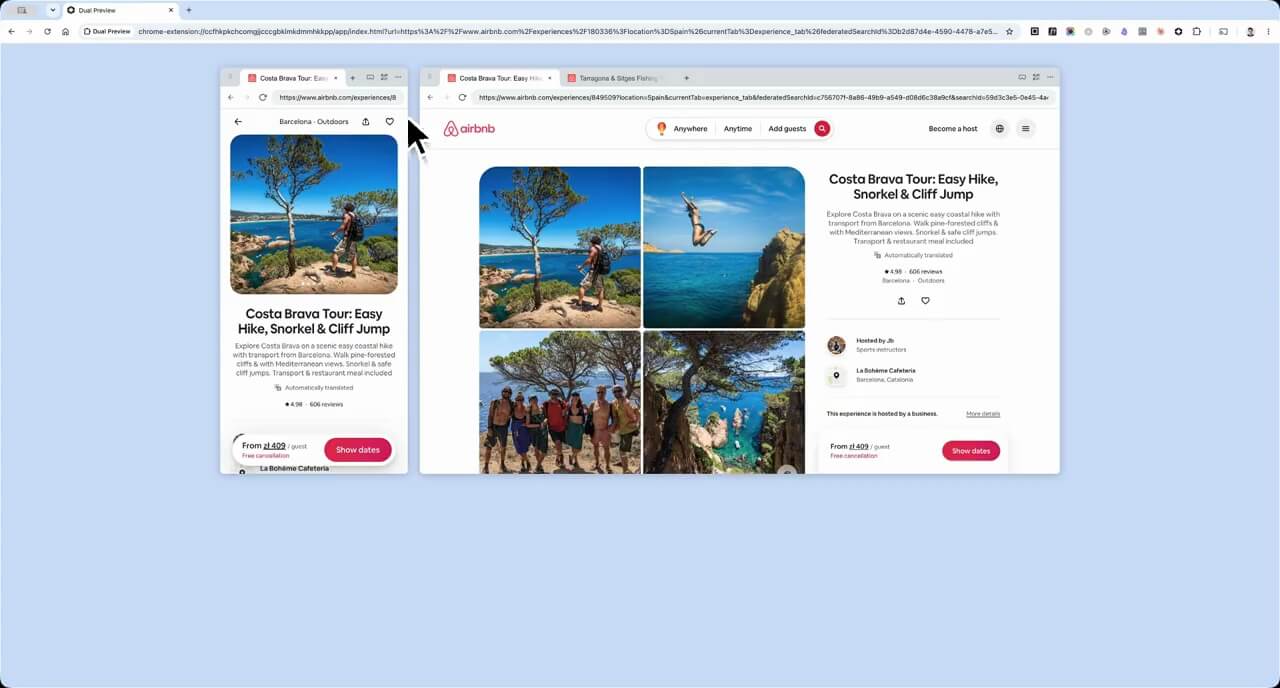
80% of internet traffic is on mobile, yet websites are built on desktop. Stop guessing how your site looks on a phone — Dual Preview is a free Chrome extension that shows both views at the same time.

Current mobile testing is difficult, inefficient, and lacks full control. Dual Preview fixes this. The free Chrome extension shows both screens side-by-side.
Paste any URL and see it on mobile and desktop simultaneously. No DevTools, no tab switching.
iPhone SE, iPhone 14, Pixel 7, Samsung S23 — precise presets for the phones your users actually own.
Compare three mobile sizes at once, or run two desktop breakpoints in parallel. Add panels dynamically.
Capture mobile and desktop in one image. Share in Slack, drop into Figma, paste into a ticket — everyone sees both.
Generate a QR for any panel URL and scan it with your phone. Feel the actual experience in your hand.
One click from any panel to PageSpeed Insights — check performance of the exact URL you're reviewing.
Check your designs against real mobile screens as you work. Easy to benchmark competitors and research how others solve the same problems — just paste any URL.
Verify responsive behavior while you work. No toggling DevTools. No mental model gymnastics.
Stop presenting desktop and calling it done. Next review, open Dual Preview and show both screens at once.
Check how articles, landing pages, and campaign creatives look on a phone — before hitting publish.
It sounds small until you realize how often you were shipping broken mobile without knowing it.
I showed this to my team during a Figma handoff meeting. Nobody could believe we hadn't been using it before.
I used to toggle DevTools back and forth during every sprint review. Dual Preview ended that. Both views, always visible.
The QR code feature is underrated. I scan it on my actual phone and instantly see the real experience. Game changer.
Simple, free, works on every site. I installed it and immediately caught a broken layout on mobile that we were about to ship.
Our PM stopped asking 'did you check mobile?' after we started using Dual Preview in every review. It's just always there now.
I use it every morning to check our landing page on multiple viewports before standup. Takes 10 seconds and saves a lot of back-and-forth.
Why did I build this? As a UX designer, I really wanted to get my hands dirty with AI and build something that solves a real problem. That meant going all the way — from idea to shipping, marketing, maintaining, and growing it. So this is it. Sure, it ain't much, but it's honest work.
I've spent 15+ years working in product, yet this project gave me a whole new kind of freedom. Building Dual Preview took real time and a lot of iteration. Don't let anyone tell you AI makes things happen instantly.
Still, the process was mostly fun, and the learning was real. It feels like I've been walking my whole life and someone just handed me a bike.
If it saves you even a few minutes a week, it was worth building.
Free Chrome extension. No account. Works on any website.
Get it on ChromeAvailable on Chrome Web Store